
World Monitor App
Hypecent LimitedNews & Magazines
4.769.00 Reviews
- Version
- 1.3.0
- Installs
- 50.00K
- Age Rating
- Everyone
Screenshots
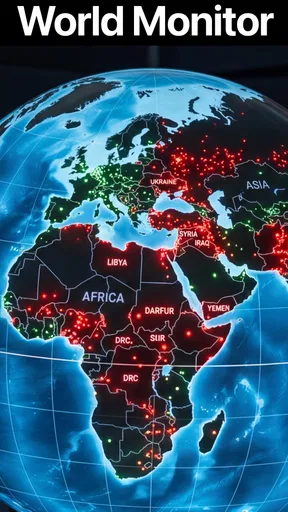
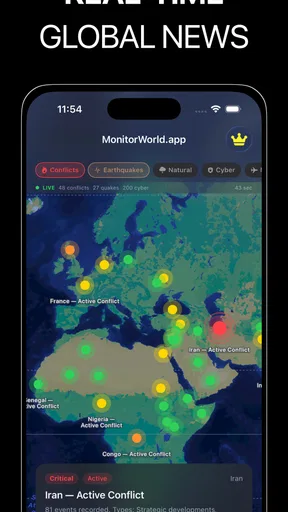
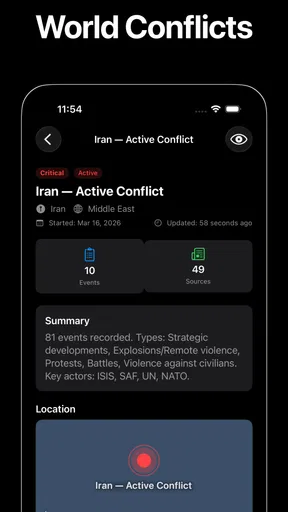
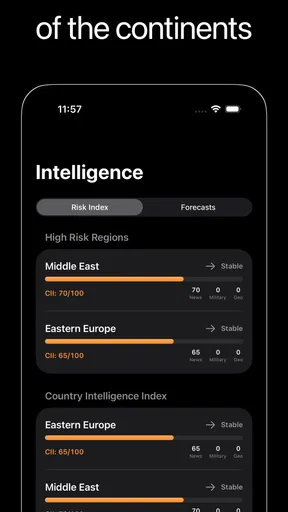
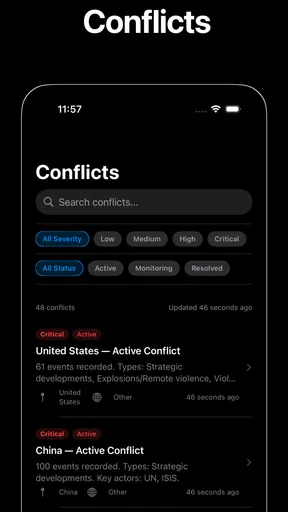
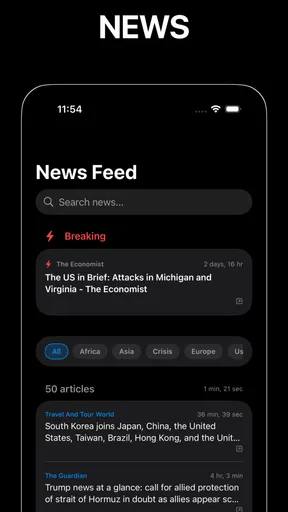
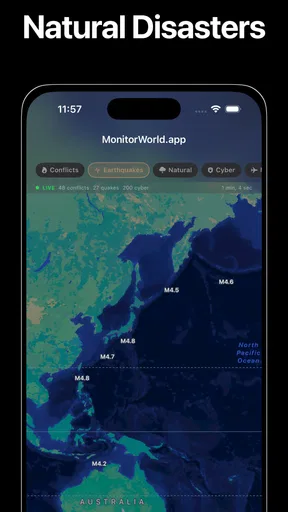
Our Review of World Monitor App
 Analysis by Appyee
I use World Monitor as a quick way to turn a busy news cycle into something I can scan with purpose. Its central idea is simple: instead of opening several news apps and jumping between unrelated headlines, I get a world-focused view designed around real-time global intelligence. That focus makes it more useful for monitoring developing situations than for casually browsing entertainment, lifestyle, or local news.
The app belongs to the News & Magazines category and is developed by Hypecent Limited. It is free to install, available to Everyone, and supports devices running Android 7.0 or later. The current release is version 1.2.6. There are optional in-app purchases ranging from $4.99 to $99.99 per item, so I would treat the free download as an opportunity to test the workflow before deciding whether any paid option fits my habits.
What stood out to me is not a promise that the app can replace every source I read. It cannot. Its value is narrower and more practical: it helps me notice what deserves attention before I decide where to read more deeply. That distinction matters. I see it as an awareness tool first, not as a complete research desk or a substitute for careful reporting.
Real-time global intelligence is the app’s defining capability
The strongest reason to open this app is when I want a broad view of what is happening across the world without building that overview manually. The store summary calls it “Real-Time Global Intelligence,” while the short description presents it as “World Monitor.” In daily use, that positioning makes sense because the experience is centered on monitoring rather than leisurely reading through a personalized magazine.
I find that especially helpful when several stories are developing at once. A conventional newspaper app usually gives me a polished editorial front page, which is excellent when I want a guided selection. A social network gives me speed, but also noise, repetition, and a high risk of seeing a story without enough context. World Monitor sits between those habits: it encourages me to look across the wider news picture first, then choose which subject deserves my time.
That sounds like a small difference, but it changes how I use it. I do not open the app expecting a long evening read. I open it for orientation. If I have five minutes before work, I can check whether there is a major international development I should understand. If something catches my attention, I can then move to a trusted publication or official source for fuller reporting.
The app’s average rating is 4.8 from around two thousand ratings, and it has passed ten thousand installs. Those figures suggest that the focused monitoring concept is connecting with its audience, although they do not remove the need to decide whether its style suits me. A high rating can indicate a satisfying core experience without meaning that every reader will prefer it to a traditional news application.
Why monitoring is different from ordinary news browsing
Most news apps are built around articles. Their basic question is, “What should you read next?” World Monitor feels more concerned with the question, “What is happening that may need your attention?” That shift benefits people who follow international affairs, business conditions, travel risks, public policy, or any subject where timing matters.
For me, the practical advantage is reduced switching. Without a monitoring-oriented app, I might check a newspaper, a broadcaster, a finance app, and a social feed separately. Each service has its own layout and priorities. A global overview gives me a starting point before I commit to that scattered routine.
There is also a useful psychological benefit. When I read a single article first, I can mistake that article’s importance for the importance of the whole news cycle. A broad monitor helps me step back. It does not automatically tell me what is true or what matters most, but it gives me a better chance of seeing the wider pattern before forming an opinion.
How I use it in practice
My most effective routine is short and deliberate. I open the app, scan the global picture, and separate three kinds of information in my head: something I need to follow now, something worth checking later, and something that is interesting but not relevant to my day. That simple classification prevents the app from becoming another endless scroll.
I recommend resisting the temptation to treat every visible item as equally urgent. A monitoring tool is naturally good at showing movement and variety, but the reader still has to apply judgment. I use the first pass to identify topics, not to reach final conclusions. Then I investigate important claims through established reporting, primary documents, or official announcements.
This workflow is one of the app’s less obvious strengths. It can function as a front door to research rather than the entire house. If I am preparing for a meeting, writing a briefing, or trying to understand why a market or policy discussion is suddenly changing, I use the app to generate a shortlist of subjects. That is more efficient than searching from scratch, especially when I do not yet know the right keywords.
Another useful habit is checking at fixed moments instead of leaving news open continuously. A morning scan can establish the day’s context, while an evening scan can show which developments persisted. I prefer this approach because constant checking makes every update feel equally important. World Monitor works better for me when I give it a clear purpose and a limited amount of attention.
A realistic morning workflow
Imagine that I am commuting and have only a few minutes before starting work. I open World Monitor to see whether the international picture has changed in a way that affects my plans, my industry, or a conversation scheduled for later. I do not try to read everything. I look for emerging themes, note the names and places that recur, and save the deeper reading for a quieter moment elsewhere.
That workflow is particularly useful for someone whose job crosses borders. A consultant, researcher, journalist, student, or business owner may not need a full article at the first moment. They may need awareness that a topic has become active. The app’s monitoring angle helps create that early signal without requiring a carefully prepared search query.
The same routine works for travel planning, but with an important caution. I might use the app to notice that a region is in the news, then verify practical travel guidance through official government channels, airlines, airports, or local authorities. A global news monitor can help me ask the right questions; it should not be my only source for safety decisions.
Three ways to get more value from the monitor
- Use it before your usual news app. A quick global scan first can prevent the first headline you see from defining your entire understanding of the day.
- Turn unfamiliar names into follow-up prompts. When a place, organization, or event appears repeatedly, write it down and research it through a source that provides background and attribution.
- Separate awareness from verification. Treat the app as a signal detector, then confirm consequential claims before sharing them, making decisions, or repeating them at work.
These habits also answer a question many people have after installing a news monitor: is it useful if I only have a few minutes? In my experience, yes, provided I use it for scanning rather than attempting to consume every item. Its value grows when I already know what I want from the session.
The best scenario is early awareness across several subjects
The app makes the most sense for readers who follow more than one international topic and do not want to maintain a collection of separate feeds. I can imagine using it before a daily briefing, during a research project, or when a fast-moving event makes ordinary news routines feel too slow and fragmented.
It is also a good fit for people who dislike algorithmic social feeds but still want speed. Social platforms often mix breaking news with jokes, commentary, personal posts, and recycled screenshots. That environment can be useful for discovering what people are discussing, but it can also blur the line between a report and a reaction. A dedicated global monitor gives the task a more focused setting.
Students may find it helpful when a class covers international relations, economics, environmental policy, or current affairs. I would not use it as the sole material for an assignment, but I would use it to identify themes for further reading. The same applies to professionals: it can help me prepare for a conversation, but it does not replace the detailed documents and specialist sources needed for a serious decision.
For a general reader, the best use may be occasional rather than constant. I do not need a global intelligence view every time I want local weather, a restaurant recommendation, or a long-form cultural article. But when I want to understand the day beyond my immediate neighborhood, the app has a clear purpose.
Where it compares well with familiar alternatives
Compared with a standard newspaper app, World Monitor appears more useful for breadth and initial orientation, while the newspaper usually wins for narrative depth, editorial explanation, and a consistent set of writers. If I want to understand the background of a conflict or the details of a policy, I still prefer a publication with specialist reporting.
Compared with a broadcaster’s app, the monitor can feel less tied to one editorial voice. That can be refreshing when I want to see a wider range of subjects, but it also means I may need to do more work to judge importance and context. A broadcaster may guide me more clearly through the day’s main story; World Monitor is better suited to independent scanning.
Compared with social media, the advantage is focus. I spend less time sorting through personal commentary and viral repetition. The trade-off is that social platforms sometimes provide immediate eyewitness discussion or niche expertise that a dedicated news app may not surface in the same way. I would not abandon every other source; I would give each one a different job.
Compared with a search engine, World Monitor reduces the effort required to know what to search for. Search is powerful when I have a precise question. It is less convenient when I suspect something important is happening but cannot yet describe it. That is where a monitoring-first experience earns its place.
The trade-offs I noticed before recommending it
The first limitation is inherent in the concept: a broad monitor can tell me that something deserves attention without giving me all the context I need. That is not a flaw unique to this app, but it is important enough to shape how I use it. I avoid making strong judgments from a quick scan, especially on complicated political, scientific, or security-related subjects.
The second trade-off is attention. A world-focused view can make the news feel endless. If I open it without a clear goal, I can move from one developing subject to another and finish with more anxiety than understanding. I get better results when I set a question before opening it, such as “What international developments could affect my work today?” or “Which stories should I read in depth tonight?”
There is also a difference between discovering a story and following it over time. A monitor is excellent at helping me notice activity, but sustained understanding requires continuity: knowing what happened earlier, which claims were confirmed, and what changed afterward. For long-running subjects, I pair the app with a publication or specialist source that provides chronology and analysis.
The free price makes trying it straightforward, but the presence of optional purchases means I would inspect any paid feature carefully before committing. The listed purchase range extends from $4.99 to $99.99 per item, which is a wide spread. I would first establish whether the free experience already covers my monitoring needs and only then consider paying for extras. That is especially sensible for casual readers who may open the app only a few times each week.
Another practical consideration is device compatibility. The app supports Android 7.0 and newer, which covers many older Android phones but not every device a reader may still be using. I would check compatibility before planning to rely on it for a work routine. The Everyone age rating also makes it broadly accessible, although age suitability does not replace good judgment when reading distressing or sensitive world news.
When I would choose something else
I would choose a traditional newspaper app when my main goal is detailed reporting from a familiar editorial team. I would choose a specialist publication when I need technical expertise, historical context, or a carefully sourced investigation. I would choose an official source when the information affects travel, health, legal obligations, or personal safety.
I would also skip World Monitor if I only want local headlines or a relaxing magazine-style reading session. Its global emphasis may feel excessive when all I need is a nearby traffic update or a simple list of local events. The app becomes more compelling as the question becomes broader, faster-moving, and more international.
Finally, readers who prefer a tightly curated feed may find a monitoring approach demanding. Some people want an editor to select a small number of articles and explain why they matter. I understand that preference. I enjoy having a wider starting point, but I also accept the responsibility of filtering it myself.
Who benefits most from this focused approach
The strongest audience is made up of people who need situational awareness more than endless reading. That includes internationally minded professionals, students, researchers, frequent travelers, and anyone who follows several countries or regions at once. For them, the app can reduce the friction of checking multiple sources just to discover what has changed.
It may also suit readers who want distance from social media but still care about speed. I appreciate that distinction because I often want to know what is happening without entering an environment designed to keep me reacting. A dedicated monitor can support a calmer routine, provided I use it intentionally and verify important details elsewhere.
Casual news readers can still benefit, but I would recommend starting with short sessions. Use the app to build awareness, identify one or two subjects, and stop. There is no prize for reading every developing item. The most useful outcome is leaving with a clearer sense of what deserves attention, not a head full of disconnected alerts.
Hypecent Limited has given this app a clear identity rather than trying to make it every kind of news product at once. That identity is its main strength. World Monitor is not the application I would rely on for the complete story, but it is the one I would consider when I need a fast, broad view before choosing my next source.
After using it in that role, my recommendation is positive but specific. Install it if you want a global starting point, follow several international subjects, and are comfortable doing a little verification and deeper reading afterward. Skip it if you mainly want local updates, long-form journalism, or a fully curated experience. For the right reader, the real benefit is not replacing the news sources you trust; it is helping you decide which one to open next.
Privacy and Permissions
See what permissions an app requests and how it handles your data.
- Location
- approximate location (network-based), precise location (GPS and network-based)
- Other
- view network connections, full network access, run at startup, control vibration, prevent device from sleeping, Google Play license check, read Google service configuration
Verdict
Strengths of World Monitor App
- Clean interface makes global events easy to scan quickly.
- Interactive maps help visualize conflicts, disasters, and other developments.
- Useful for users who want international news in one place.
- Frequent updates can provide a broad real-time overview of events.
- Supports quick comparisons between regions and ongoing situations.
Limitations of World Monitor App
- Some alerts may feel alarming without enough background context.
- Information quality can vary depending on the underlying news sources.
- Map-heavy screens may use considerable data and battery.
- The large volume of events can make important stories hard to spot.
- Advanced monitoring features may be limited without a subscription.
Similar Picks in This Category
View All
Google News - Daily Headlines
Google LLC4.0

X
X Corp.4.8

Flipboard:Your Social Magazine
Flipboard3.4

Opera News: breaking & local
Opera4.5

Hindi News by Dainik Bhaskar
Dainik Bhaskar Group4.0

Way2News Daily News App
Way2News ( Formerly Way2SMS )4.6
Frequently Asked Questions
What is the World Monitor app used for?
World Monitor is designed to help users follow important global events through a consolidated view of news, alerts, maps, and other monitoring tools. Depending on the version available for your device, it may focus on geopolitical developments, conflicts, disasters, markets, or breaking international stories. It is best understood as an information dashboard rather than a replacement for detailed reporting from trusted news organizations.
Does World Monitor provide real-time information?
World Monitor may display frequently updated information, but the speed and accuracy of updates can vary according to the data source, internet connection, regional availability, and the type of event being tracked. During a fast-moving situation, information can change quickly or remain incomplete. Before relying on an alert for travel, safety, or financial decisions, compare it with official announcements and reputable independent sources.
Is World Monitor free to download and use?
The app may be available to download at no initial cost, although some features can depend on the developer’s current pricing model. Certain versions may include advertising, optional subscriptions, premium monitoring tools, or in-app purchases. Users should check the Google Play Store or Apple App Store listing before installing, paying particular attention to subscription terms, renewal conditions, and any limitations placed on the free version.
What permissions and personal data does World Monitor require?
The permissions requested by World Monitor can differ between Android and iOS and may change after updates. A monitoring app could request internet access, notifications, location access, or permission to run background updates. Review the store’s privacy section and the app’s permission prompts carefully. If location services are optional, consider disabling them unless they are necessary for a feature you intend to use.
Can World Monitor be trusted as the only source of breaking news?
World Monitor can be useful for discovering developing stories and keeping several topics in one place, but it should not be treated as the only authority for important information. Aggregated feeds may contain delays, incomplete context, or reports that are still being verified. For emergencies, travel restrictions, public safety instructions, and major political or military developments, confirm details through official agencies and established news outlets.
